Relation Navigator for Filament
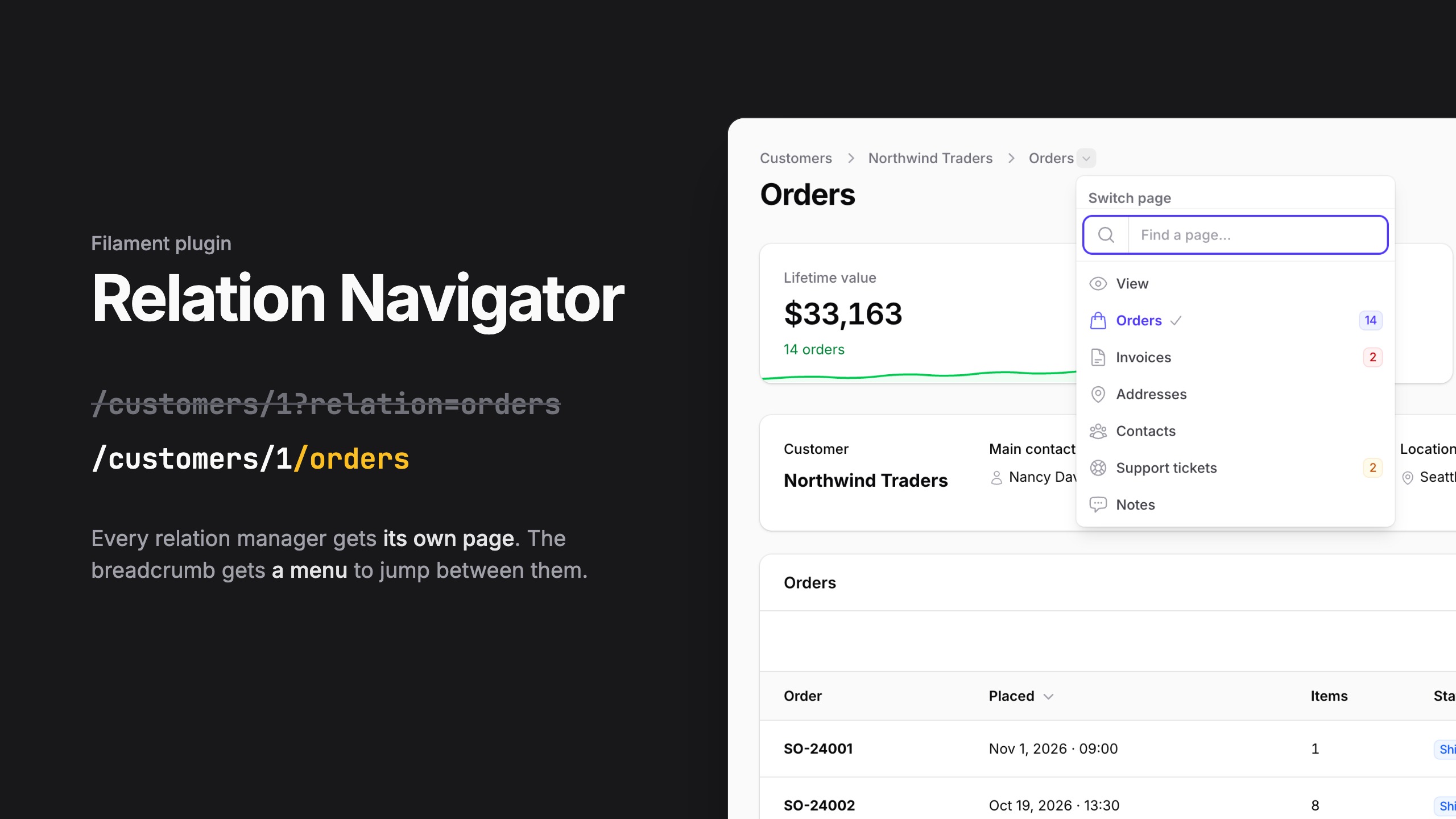
Give every relation manager of a Filament resource its own page, and jump between them from a menu in the breadcrumb.
/customers/1?relation=ordersbecomes/customers/1/orders: a real route you can link, bookmark and open in a new tab.- The page renders the relation manager you already have: same table, filters, actions, badges and authorization. Nothing is duplicated.
- Add a header above the relation (the record's card, widgets, actions), taken from the resource.
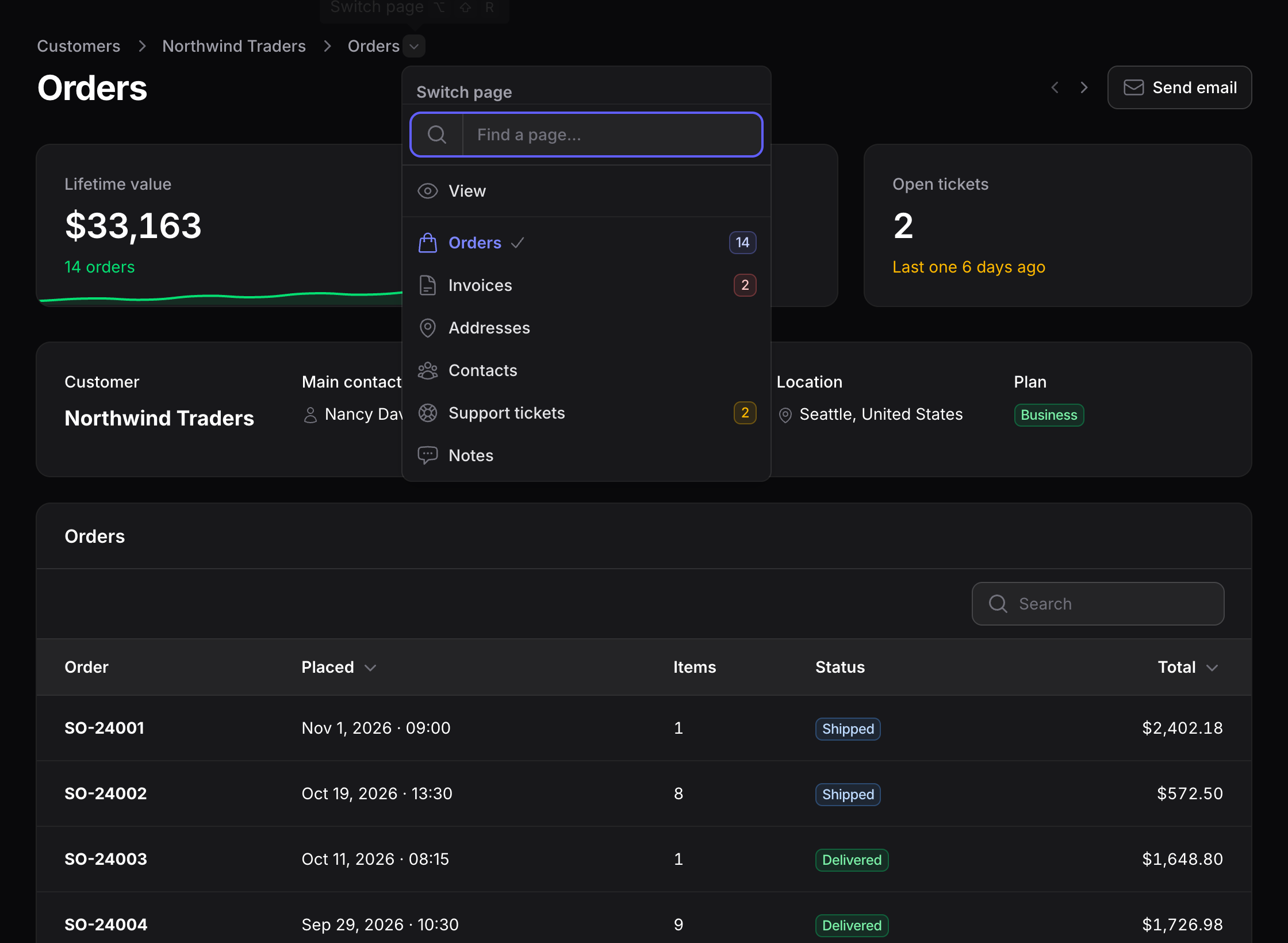
- The last breadcrumb opens a menu with the record's pages and every relation the user can see, with icons and badges. Two looks, optional search and keyboard navigation, a view of your own, and a version for small screens.
- One trait, no page classes: no files to generate, nothing to add to
getPages()or to the panel provider.
Requirements
| Package | Version |
|---|---|
| PHP | 8.2+ |
| Laravel | 12, 13 |
| Filament | 4.x, 5.x |
Installation
composer require wit3/filament-relation-navigator
php artisan filament:assets
Run filament:assets again after each update: Filament copies the plugin's stylesheet into public/.
Quick start
1. Give the relations a page. Add the trait to the resource:
use Wit3\FilamentRelationNavigator\Concerns\HasRelationPages;

class CustomerResource extends Resource
{
    use HasRelationPages;

    public static function getRelations(): array
    {
        return [
            'orders' => OrdersRelationManager::class,
            'invoices' => InvoicesRelationManager::class,
            NotesRelationManager::class,
        ];
    }
}
Every relation now has its page: /customers/1/orders, /customers/1/invoices, /customers/1/notes.
2. Add the menu to the view page:
use Wit3\FilamentRelationNavigator\Concerns\HasRelationNavigator;

class ViewCustomer extends ViewRecord
{
    use HasRelationNavigator;
}
That's all. The relation pages have the menu already, and the tabs on the view page keep working as before.

Relation pages
Opting in
Opt in on the resource, for every relation manager, or only on the relation managers you want:
use Wit3\FilamentRelationNavigator\Concerns\InteractsWithRelationPage;

class OrdersRelationManager extends RelationManager
{
    use InteractsWithRelationPage;
}| Setup | Relations with a page |
|---|---|
HasRelationPages on the resource | all, minus the ones that opt out |
InteractsWithRelationPage on a manager | only the managers that opt in |
| A page class you wrote (see below) | all, minus the ones that opt out |
To leave some relations out:
// On the resource
public static function hasRelationPage(string $slug): bool
{
    return $slug !== 'notes';
}

// On a relation manager, with InteractsWithRelationPage
protected static bool $hasRelationPage = false;
A relation manager shared by two resources opts in for both: use the resource's hasRelationPage() to leave one of them out.
URLs and slugs
getRelations() entry | URL |
|---|---|
'orders' => OrdersRelationManager::class | /customers/1/orders |
SupportTicketsRelationManager::class (no key) | /customers/1/support-tickets |
RelationGroup::make('Activity', [...]) | /customers/1/activity |
The key in getRelations() wins; without a key, the slug is the kebab-cased relationship name (or the group label). A relation manager can pick its own with protected static ?string $relationPageSlug = 'tickets';. Slugs equal to one of the resource's page keys (edit, view...) are skipped.
Each page is a named route, relations.{slug}:
CustomerResource::getUrl('relations.orders', ['record' => $customer]);Authorization and behaviour
The relation manager receives the resource's view page as $pageClass (the edit page when there is no view page), so isReadOnly(), canViewForRecord(), getBadge() and every other check behave exactly as in the tab. A relation page needs both the view page's canAccess() and the manager's canViewForRecord(); an unknown slug is a 404.
Header, actions and widgets
Above the relation, a relation page can show part of the record's view, header actions and widgets. Define them on the resource for every relation page, or on a relation manager for its own page:
public static function relationPageHeader(Schema $schema): Schema
{
    // The whole infolist (static::infolist($schema)) or a piece of it.
    return $schema->components([
        CustomerCard::make(),
    ]);
}

public static function getRelationPageHeaderActions(): array
{
    return [
        Action::make('email')
            ->url(fn (Customer $record): string => "mailto:{$record->email}"),
    ];
}

public static function getRelationPageHeaderWidgets(): array
{
    return [CustomerStats::class]; // receives the record as $record
}

public static function getRelationPageFooterWidgets(): array
{
    return [];
}- The header of a relation manager replaces the resource's one; actions and widgets of both are shown, the resource's first.
- Header actions act on the record the relation belongs to.
- With a header, the record's name is not repeated under the title.
- Pieces that only exist inside the view page class (its own methods and modals) are not reachable from here: move them to the resource, to an action class or to a trait.
The breadcrumb menu
A record page is in the menu if, and only if, it uses HasRelationNavigator: the view page, the edit page or any custom page of the record. On those pages the last breadcrumb opens the menu. The relation pages are always listed, after the record pages, with the relation managers' icons and badges, and only when the user can see them.
If the page already builds its own breadcrumbs, pass them through withRelationNavigator():
public function getBreadcrumbs(): array
{
    return $this->withRelationNavigator([
        CustomerResource::getUrl('index') => 'Customers',
        $this->getBreadcrumb(),
    ]);
}
A custom page that uses InteractsWithRecord itself, instead of extending ViewRecord or EditRecord, has two getBreadcrumbs() methods. Unless it defines its own, tell PHP which one wins:
class CustomerActivity extends Page
{
    use HasRelationNavigator, InteractsWithRecord {
        HasRelationNavigator::getBreadcrumbs insteadof InteractsWithRecord;
        InteractsWithRecord::getBreadcrumbs as getRecordBreadcrumbs;
    }
}
The menu uses the page's $navigationLabel and $navigationIcon, and shows it only when canAccess() allows it for the record.
Menu presets
Publish the config:
php artisan vendor:publish --tag=filament-relation-navigator-config'menu' => [
'preset' => 'simple', // 'github', a preset of yours, or a view name
'presets' => [
'simple' => 'filament-relation-navigator::menu.simple',
'github' => 'filament-relation-navigator::menu.github',
],
'searchable' => false, // a search field on top of the list, whatever the preset
'search_from' => 0, // ...from this many items
'badges' => true, // the relation managers' badges, as in their tabs
'max_height' => '24rem',
'separator' => true, // record pages and relation pages in two blocks
'mobile' => true, // the menu above the heading on small screens
],simple: the last breadcrumb itself opens the list (screenshot above).
github: the last breadcrumb stays text and a caret next to it opens a panel with a heading and a check on the current page, like GitHub's repository switcher. Here with searchable on: the field gets the focus when the menu opens and Enter opens the first match.
Keyboard: from the search field, Down moves into the list; Up and Down move between the pages, Enter opens one, Escape closes the menu.

A page can override any of them:
public function getRelationNavigatorPreset(): string
{
    return 'github';
}

public function isRelationNavigatorSearchable(): bool
{
    return true;
}

public function hasRelationNavigatorBadges(): bool
{
    return false; // the badges run the same queries as the tab badges
}
Small screens
Filament hides the breadcrumbs below 40rem. There the menu shows above the page heading instead, on every page that uses HasRelationNavigator, with the same preset options. Turn it off with 'mobile' => false, or per page:
public function hasRelationNavigatorMobileMenu(): bool
{
    return false;
}
Translations
English, Italian, Spanish, German, French, Brazilian Portuguese and Dutch. Publish the translations to change them or add a language:
php artisan vendor:publish --tag=filament-relation-navigator-translationsA preset of your own
Start from one of the package presets:
php artisan make:filament-relation-navigator-preset compact --from=githubIt copies the preset to resources/views/filament/relation-navigator/compact.blade.php. Register it and change it as you like:
'preset' => 'compact',
'presets' => [
    // ...
    'compact' => 'filament.relation-navigator.compact',
],
Any view name works as preset too. To change the package presets themselves, publish their views:
php artisan vendor:publish --tag=filament-relation-navigator-viewsA preset view receives:
| Variable | Content |
|---|---|
$label | The last breadcrumb |
$items | The menu items: key, label, url, icon, badge, badgeColor, isActive |
$heading | "Switch page", translated |
$isSearchable | Whether to show the search field |
$hasSeparator | Whether to split record pages and relation pages in two blocks |
$searchPlaceholder | "Find a page…", translated |
$emptyLabel | "No pages found.", translated |
$maxHeight | menu.max_height |
Each item also has isRelationPage(). To reuse the search field, the list (with the separator and the keyboard navigation) and the "no results" line, include filament-relation-navigator::menu.partials.list with showCheck.
Customising the relation pages
The generated relation pages cover most needs. To change their title, their breadcrumbs or anything else a Filament page can do, write the page class yourself; the package then uses yours for that resource:
php artisan make:filament-relation-navigator CustomerResourceclass CustomerRelationPage extends RelationPage
{
protected static string $resource = CustomerResource::class;
protected static ?array $relations = ['orders', 'invoices']; // only these
protected static array $excludedRelations = ['notes']; // never these
}public static function getPages(): array
{
return [
'index' => ListCustomers::route('/'),
'view' => ViewCustomer::route('/{record}'),
...CustomerRelationPage::relationRoutes(),
];
}The class is a regular Filament page: override getTitle(), getBreadcrumbs(), getHeaderActions(), use your own traits, and so on.
Native record sub-navigation
The same items can feed Filament's record sub-navigation:
public static function getRecordSubNavigation(Page $page): array
{
    return RelationNavigator::getRecordSubNavigation($page);
}
How it works
- The routes are registered through Filament's own
Resource::registerRoutes(), inside each resource's route group: slug, cluster, parent resource and tenant are handled by Filament. - The page class of a resource is written on demand to
storage/framework/cache, the way Laravel's real-time facades work, and registered with Livewire. It works withroute:cache. - The relation page embeds the relation manager as Filament does in the tabs, so its state, actions and modals stay in the relation manager.
Testing
composer test        # the test suite
composer analyse     # PHPStan, level 8
composer format      # Pint
The suite runs on Filament 4 and 5, Laravel 12 and 13, PHP 8.2 to 8.5, and covers nested resources, clusters, tenancy and SPA mode.
The browser tests (the searchable menu) need Playwright:
npm install && npx playwright install chromium
vendor/bin/testbench filament:assets
composer test:browser
Changelog
See CHANGELOG.
Contributing
Issues and pull requests are welcome. Please run composer test, composer analyse and composer format before opening a pull request.
Security
Please report security issues privately through GitHub security advisories rather than in public issues.
Credits
License
The MIT License (MIT). See LICENSE.